
Practical answers on coaxial HD installation: cable length and gauge, solder-free versus soldered BNC connectors, converter cascading and loop-out, tester steps, and HDMI-to-coax bands.
How Far Coax Runs and Which Gauge to Pick
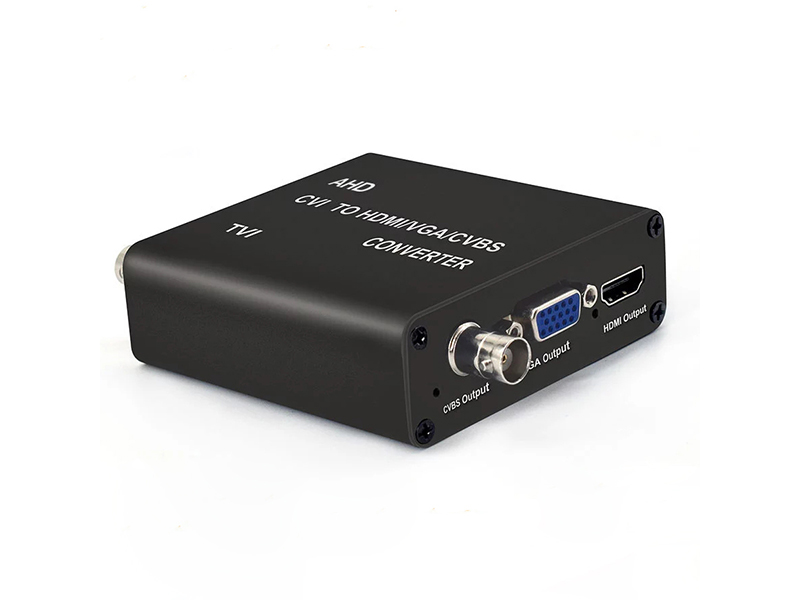
Start from the hardware label: the 5MP AHD/TVI/CVI to HDMI/VGA/CVBS converter is rated for coaxial transmission up to 300 m, an input-side figure that assumes sound cable and connectors. Actual distance depends on gauge, length, connector count and branches, and attenuation rises as the 75-ohm specification gets smaller. By experience: 75-3 or RG59 for short jumpers and small-area wiring with 1080P held inside 100 m; 75-5 or RG6 for trunk runs and longer points, the steadier choice from 150 to 250 m; and 75-7 for 300 m close to the labelled ceiling, or a converter plus loop-out at the host end.
Judge by measurement, not estimation. Once the cable is laid, watch the picture for that channel on a tester. When snow, soft edges or colour shift appear, change the gauge and the connectors before changing the camera. Do not leave spare branches inside the same conduit, because an unterminated open branch is a reflection source by itself.
Solder-Free or Soldered BNC
Solder-free compression connectors install fastest, and the risk concentrates in oxidation of the centre conductor and impedance change after bending; snow and colour drift turn up commonly after a while in damp environments. Soldered BNC connectors or factory-made patch cables are more stable, and outdoor points also need waterproofed connectors: heat-shrink tubing with layered waterproof tape, the connector facing down so water cannot seep in.
Three workmanship bottom lines: the shield must be crimped fully without shorting to the core, keep the connector count on one run as low as possible, and do not join several cable segments with adapters. Ground the shields at both cable ends at one point only, since grounding at two points forms a ground loop and regular horizontal bars.
When the Camera Menu Will Not Come Up
First establish whether the model supports coaxial control. The 30×30 mm starlight pinhole micro AHD camera VDC-MC03F20NS-30, the 30×30 mm board model VDC-MC04F20NS-30 and the quad-format micro camera VDC-MC02F20NS mark their UTC row as supported or Yes, so menu control rides on the coaxial cable with no extra control wire. The 2MP starlight pinhole camera VDC-MC01F20NS marks its UTC row No and can only be driven from body buttons or by connecting a tester directly at the point.
On a UTC-capable model, work three checks when the menu will not open: whether the channel passes through equipment that does not transparently carry the control signal; whether cable length and connectors attenuated it; and whether the OSD call function is enabled on the recorder or tester. The 7-inch IPS touchscreen 5-in-1 4K CCTV tester supports coaxial PTZ control and OSD menu calls under 8MP TVI and 8MP AHD tests, and can switch the band from 960H to 1080P on site.
Using a CCTV Tester on Site
A tester turns observed symptoms into recorded numbers. The models sold here share a 7-inch touchscreen at 1920×1200 resolution, support H.265 and H.264 network camera tests with 4K shown on the main stream, and handle 8MP TVI and 8MP AHD tests at 3840×2160P@15fps with 4x zoom plus recording and playback. The 6-in-1 model adds SDI and EX-SDI and CVBS. The 7-inch full-function retina touchscreen model integrates a cable tracer, analog video level meter, digital multimeter, optical power meter, visual fault locator and TDR V2.0 cable fault location.
Work the sequence below and one visit captures every record.
- Confirm supply: meter the front-end voltage with the multimeter and compare it against the DC12V±10% lower limit of 10.8 V.
- Check TV system and band: connect the camera, read the OSD, and confirm PAL or NTSC and 1080P or 960H.
- Judge the picture: use 4x zoom on edge sharpness to tell whether the line causes attenuation.
- Levels and cable: run a TDR test once and log length and breakpoint position for later expansion.
- Network test: enter the RJ45 port to test an IP camera and confirm the negotiated rate and the stream address.
- Coaxial control: when parameters must change, use coaxial PTZ and the OSD call to set the band directly.
- Keep evidence: record a clip and play it back once as the acceptance and after-sales basis.
Converter Cascading and HDMI-to-Coaxial Band Settings
The 5MP converter model states support for multi-stage cascaded networking, and its coaxial loop-out is a pass-through, so the original recorder connects in parallel and display and recording run together without stopping the record during the works. When cascading, each stage's loop-out strings into the next, but total run length stays limited by coaxial attenuation: past a sensible distance the picture degrades, and the fix is fewer stages or shorter cable rather than endless chaining. The 8MP band converter takes input up to 8MP, gives HDMI and VGA output at 720P@60Hz or 1080P@60Hz, and supports NTSC and PAL on composite video. Both bands peak at 4 W per unit, measure 80×84×28 mm, and weigh 200 g and 185 g net, so they mount behind a monitor with no rack required.
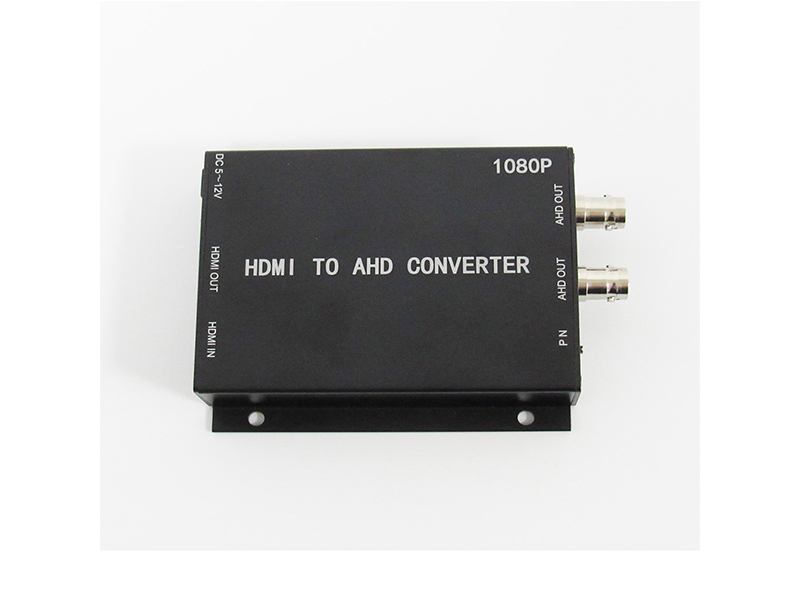
The reverse direction, HDMI to coaxial, applies when digital video must enter a recorder or monitor that only accepts analog HD input: saving a laptop or set-top-box picture into a conference-room DVR, showing a display stand on a surveillance screen, or expanding an old system whose host ports are all coaxial. The 1080P HDMI-to-AHD video converter provides one HDMI input with one HDMI loop-out and two standard BNC AHD outputs. Its AHD output format is 1080P 25 or 30, it runs on a wide DC 5 to 12 V supply, and a steadily lit red indicator means power is present.
Set the P/N position by site mains and the host's band: P is PAL 1080P@25 for 50Hz markets and N is NTSC 1080P@30 for 60Hz markets. The input side recognises 480i60, 576i50, 720P60, 1280×1024, 1024×768, 1366×768, 1080i50, 1080i60 and 1080P25/30/50/60, so set the source into a band the converter supports before troubleshooting.
When Wireless or Extension Replaces Cabling
Where conduit cannot cross a space, switch to wireless. The 1080P and 4K 200 m wireless HDMI extenders carry HDMI signals over 200 m by radio, which suits conference-room projection, stage screens and floor-to-floor display. On the encoder side the wireless version supports 802.11b/g/n with indoor range under 30 m and outdoor range under 100 m, and keeps one auto-negotiating 100 Mbps wired port. Use wireless for temporary streaming and exhibitions; return to a wired link for long-term watch duty.
When weighing these two against a coaxial retrofit plan there is one criterion: whether the point is permanent and whether the video must be recorded continuously. Permanent points take cable with a converter or encoder; short-term display takes wireless extension; do not run all-day recording on a wireless link. Shenzhen VIDCOM Technology Co., Ltd. is at 4F, Building 2, Zhongtai Industrial Park, Donghuan 1st Road, Longhua District, Shenzhen. Send site models, TV system and target recorder to info@vctcctv.com, or call +86-755-28146081, to confirm compatibility.